
What they are actually for
Categories help you review where money went and decide what to examine next. If a monthly split does not answer the question you have, consider whether the groupings need changing rather than assuming that there is one correct list for everyone.
Look at last month’s summary and ask what you want to learn from it. “Online shopping” at £240 combines several possible purposes, while “Eating out” at £240 identifies one. Which distinction helps depends on what you are trying to review.
One useful criterion is the purpose of a purchase, rather than only the shop or payment method. Keep the distinction consistent enough to compare similar entries over time.
How many you need
There is no universal number of categories. Start with groupings that answer your questions, and archive those you do not use. Too much detail can add work, but a larger list may still be useful when the distinctions matter to you.
Sumant includes 35 expense categories and 12 income categories. You can archive ones you do not use and restore them later. Creating or editing your own categories requires PRO; that limit does not apply to archiving a category.
Sources: Sumant plans · checked on .
Here is one possible grouping to review, rather than a list that fits almost every household:
Recurring commitments: housing, utilities, insurance, contributions and commuting. Check what each agreement covers and when it can change. Some costs can be reviewed during the year; they are not all fixed until an annual renegotiation.
Frequent purchases: groceries, eating out, clothing or other spending you want to follow. Choose separate categories where the distinction helps you compare amounts or decide what to review.
Occasional spending: health, gifts, travel, learning, pets or home purchases. Review it over a period that includes the payments, including costs that may recur only once a year.
Sources: Finanzas para Todos: a personal budget · checked on .
The line between the first two blocks is fixed versus variable expense, and it is the one that pays off most if you are only going to make one cut.
The rule for not hesitating
When a purchase could fit several categories, ask what it was for and how you classified similar purchases. Some entries have more than one reasonable interpretation. Choosing a consistent approach makes later comparisons clearer.
For example, you might put food bought for a dinner with friends under “Groceries” or “Going out”, depending on the question you want the categories to answer. A charger could fit a separate household category. The shop name alone does not decide.
When in doubt, choose a reasonable category and return to it if it affects the review. One uncertain entry does not establish that the habit will fail. You can correct it later without turning every purchase into a detailed exercise.
The six hard cases
1. The mixed receipt
An £80 supermarket purchase includes £20 of detergent and cleaning products. That is 25 per cent of this receipt, not evidence of a 2 per cent monthly error. You can use the main category for a simple record, or record separate amounts if that detail matters, while keeping the total correct.
2. Amazon, eBay and the like
A category named after a shop can combine different purposes, such as groceries, clothes and gifts. If you want to compare those purposes, categorise the contents rather than the shop. A shop-based grouping is only useful if that is the question you need to answer.
3. Subscriptions
You have two options and both are fine, but pick one and stick to it: either all together under “Subscriptions” —good if your aim is to review them in one go once a year— or each in its usage category, with music under “Going out” and cloud storage under “Home” —good if your aim is to know what your leisure really costs.
4. Cash withdrawals
Taking £100 out of a cash machine is not an expense: it is moving money from one account to another. Log it as an expense and you count it twice on the day you actually spend it. It goes as a transfer to a cash account, and from there it leaves as a normal expense when you use it.
5. Money paid back to you
You pay £120 for dinner and receive £100 back. Your net personal cost is £20, but the £120 leaving and £100 returning are real cash flows. Keep them identifiable if you want to reconcile the account; do not assume that reducing the original payment describes both movements.
Sumant has an income category called “Refunds”. Use an appropriate category and description for money returned, while distinguishing it from salary or other earnings. The app does not promise a linked refund feature that automatically changes the original expense.
6. Costs split between personal and work
For costs connected with your work, keep the business and personal parts identifiable; the freelance finances article explains separating those records. A mixed-use cost may need an allocation based on your circumstances. This is not a tax-deduction rule.
Subcategories: when they earn it
Splitting a category into smaller groups can be useful if those groups answer different questions. In Sumant, categories are flat: there is no parent-and-subcategory hierarchy. Do not expect the app to create that structure automatically.
For example, separating video subscriptions may help you review individual services. Separating groceries by shop may be useful for a different question. Neither split is universally necessary; choose the detail you expect to use.
Before adding a category, check whether the distinction will help your next review. A fixed 10 per cent threshold does not determine that. A small but relevant cost may deserve attention, while a large category may already answer the question clearly.
If yours are already a mess
If much of your history sits under “Other”, first decide which period you need to compare. You may only need to correct recent entries, but older records can also matter for a longer review. There is no rule that they will never be useful.
Review the categories you use, archive unnecessary options and identify any missing distinctions. Creating or editing categories requires PRO. Then correct the entries needed for the comparison you have chosen, keeping a note of when your approach changed.
Changing categories can affect comparisons with earlier months. Keep the change visible and use a comparable period where possible, instead of assuming that every earlier entry must be redone.
Keeping them alive
A periodic review can check unused categories and large groups you want to understand better. Archive an unused category if appropriate, and split a group only when the distinction helps. Taking more than 20 per cent of a month does not by itself prove that a category needs splitting.
Sources: Finanzas para Todos: a monthly budget · checked on .
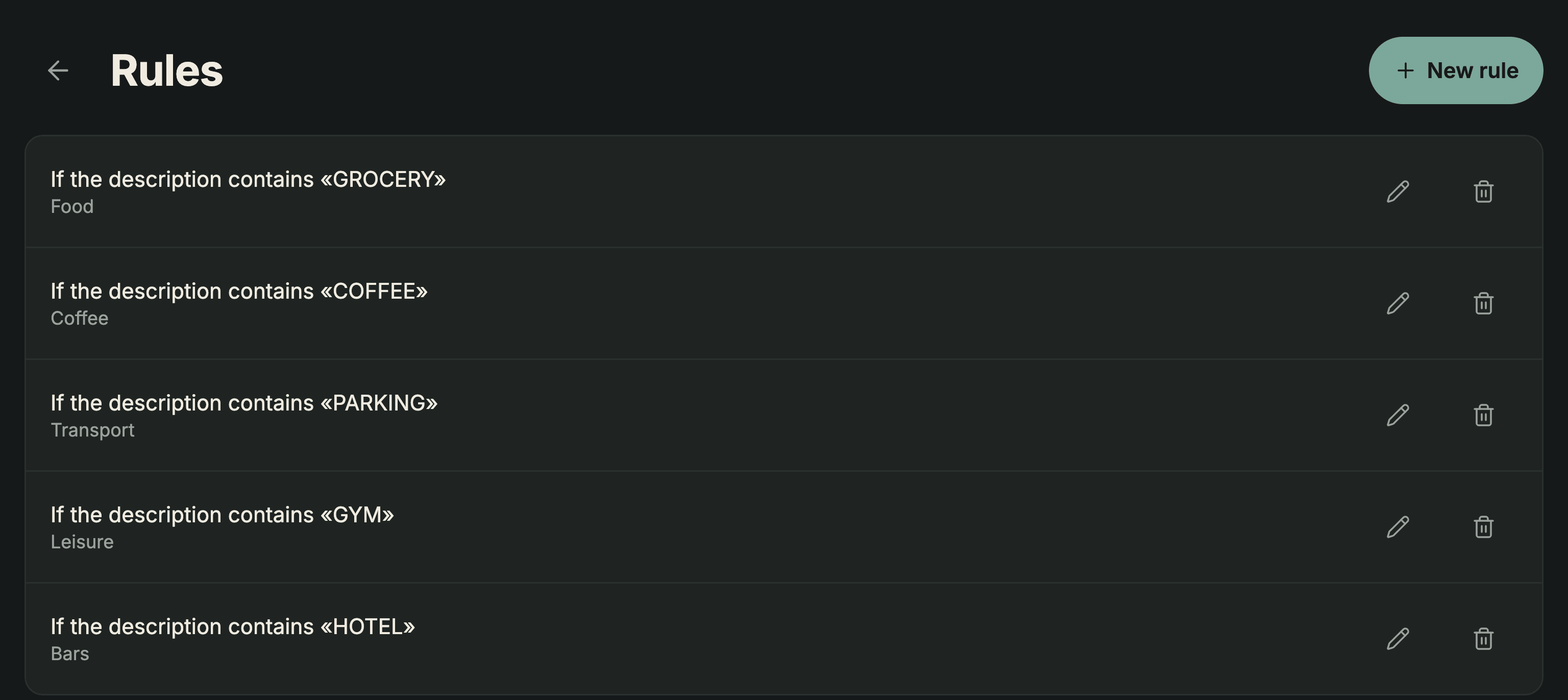
In Sumant, PRO lets you create and manage categorisation rules for future imports. They can suggest a category when the description matches; review the preview before confirming. They do not apply to manually added entries or rewrite historical transactions. Rules already saved remain available to imports if you leave PRO.
Sources: Sumant plans · checked on .
If you are coming from a spreadsheet with twenty columns, the move from columns to categories is covered in the Excel template for monthly expenses, and if you are not logging anything yet, the order to start in is in the starter guide.