Skip to content
All alternativesComparison · Mint

Looking for a Mint alternative? Compare how you want to track expenses.

Mint has been retired and its official site points to Credit Karma. If you are choosing another expense tracker, start with how you want transactions to arrive and what you need to review. Sumant offers manual entry and file imports; it does not provide automatic bank connections or direct migration from Mint.

By Oscar Gómez · Reviewed on

What to compare before choosing

  • Mint is a retired service; this is a comparison of your current needs.
  • Sumant uses manual entry and file imports, without automatic bank connections.
  • An old CSV file may be a starting point, but a complete migration is not guaranteed.
  • Compare the free plan and paid features before choosing a new routine.

What happened to Mint?

Mint has been retired, and its official website now directs people to Credit Karma. Intuit announced the transition in October 2023. That history does not establish that every former Mint feature or account is available there today. Check the current service and its conditions separately from deciding how you want to track expenses.

The sources below document the announcement and the current destination of Mint's website. This guide does not provide a current export procedure for Mint, a way to recover an old account or an exact shutdown date that those sources do not establish.

Mint: official website · Checked on

Intuit Credit Karma: announcement of 31 October 2023 · Checked on
What should you compare in a Mint replacement?

Start with the jobs you need a replacement to do: bring in transactions, include cash expenses, organise categories and review a month. Then check devices, plan limits and export options. Automatic bank connections and manual recording are different approaches; a tool that suits one does not necessarily meet a requirement for the other.

Current needs, Sumant's response and the limits to check
Your needWhat Sumant offersCondition or limit
Add transactionsManual entry or file import.No automatic bank connection.
Review a monthTransaction lists, categories and a monthly summary.The result depends on the transactions you record or import.
Work on a computer or phoneA web app for both screen sizes.An account and sign-in are required.
Bring existing recordsCSV and XLSX import with review before confirmation.Columns and selected transactions need checking; not a full Mint migration.
Export saved dataJSON export on the free plan.CSV and XLSX exports require PRO.
Use budgetsBudgets to follow planned spending.Check the current plan's included limits before choosing.
Check current features and plan limits

How does Sumant differ from a connected-account workflow?

In Sumant, you enter transactions yourself or bring them from a file and review them before confirming. The app does not retrieve new transactions through an automatic bank connection. This makes recording and checking files part of your routine; consider whether you want to do that work before choosing it as a replacement.

You can include cash expenses and choose categories as you record or review transactions. Start with a period you can check against your existing records. This comparison is published by Sumant and describes its current workflow; it is not a test of a former Mint account or a direct connection to Credit Karma.

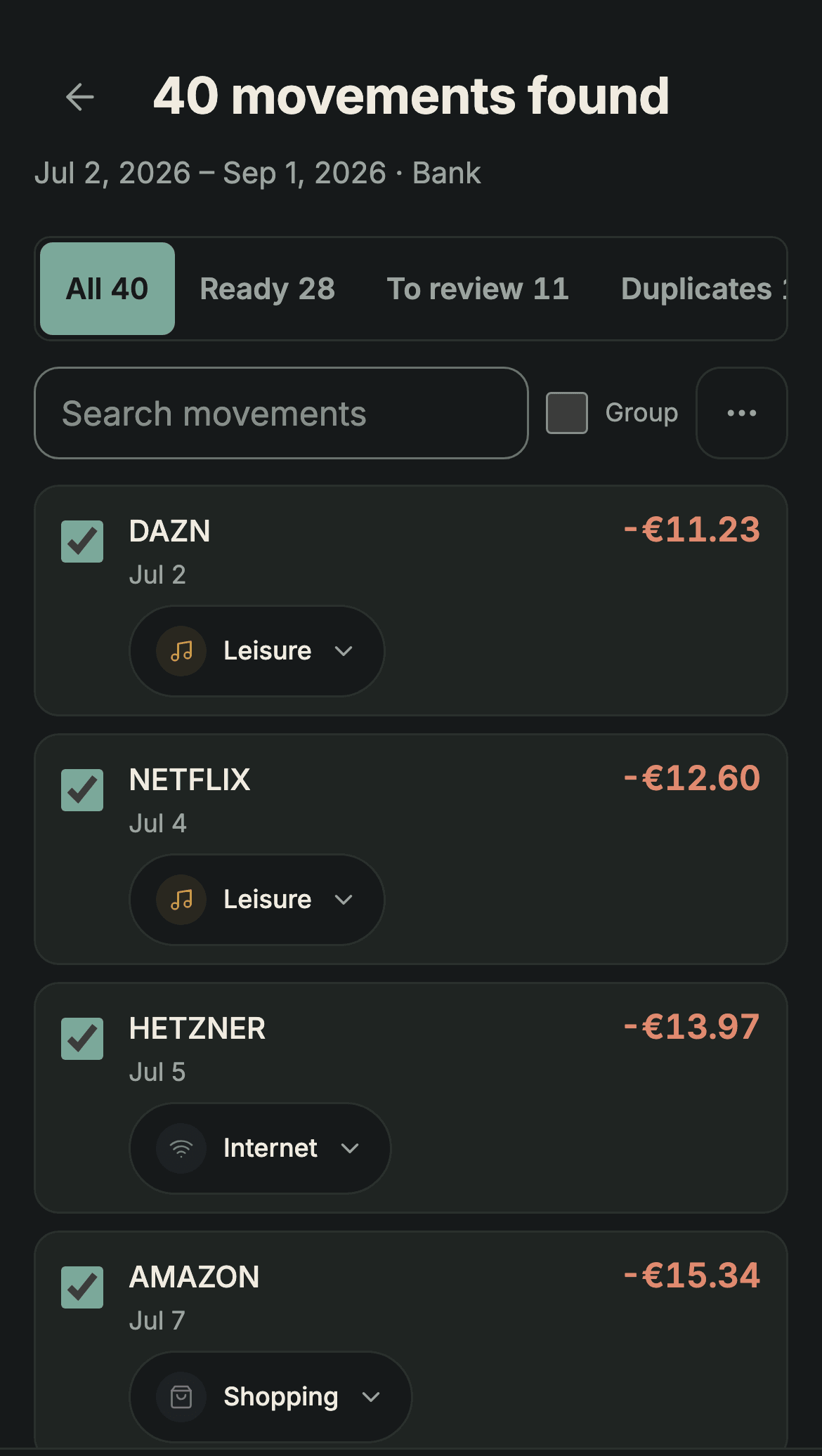
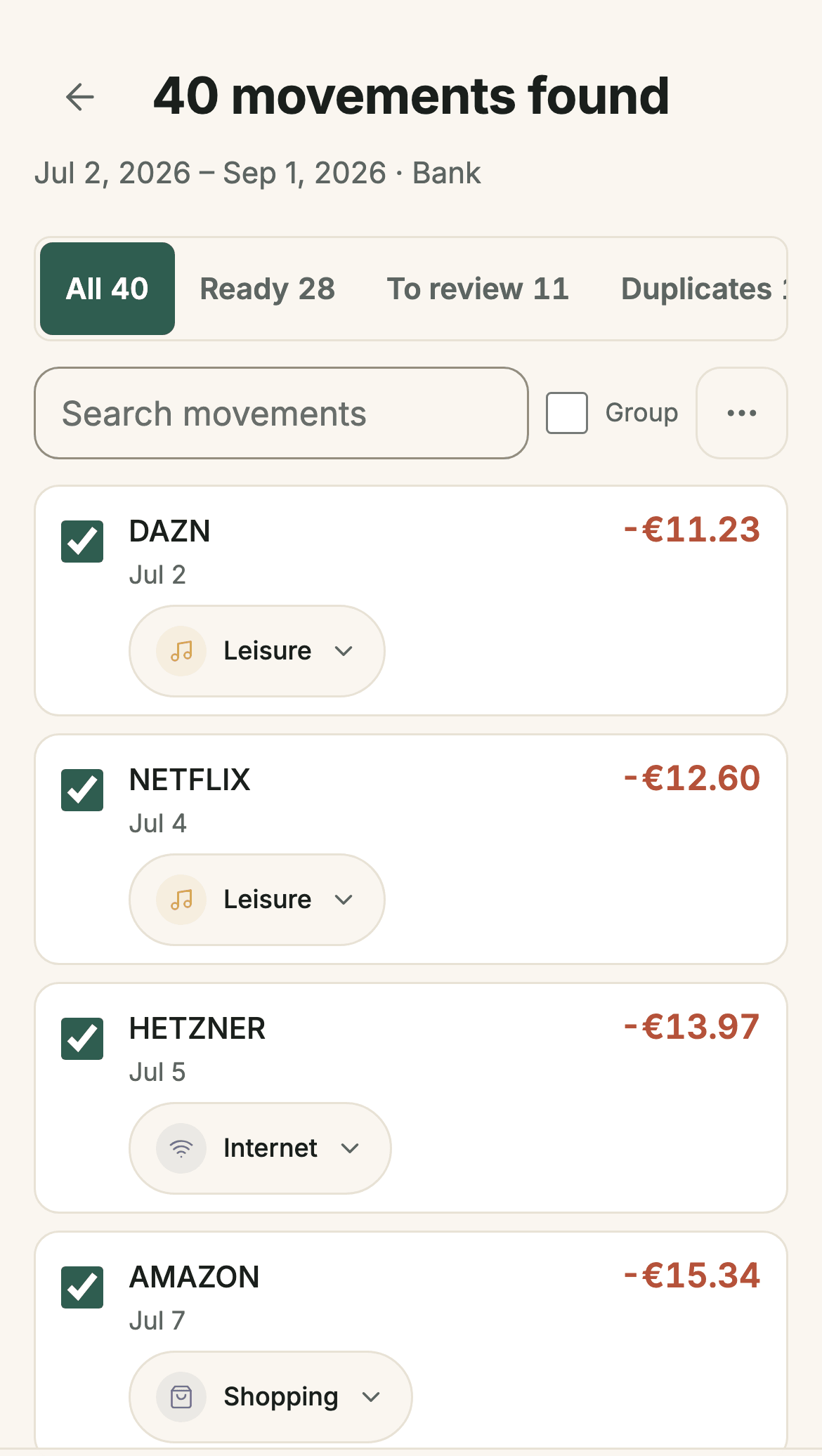
Reviewing imported transactions in Sumant before saving them
Sumant screenshot: reviewing an import. The filters let you check transactions, categories and duplicates before confirming.

Can you use an old CSV export?

If you already have a CSV file, you can check whether its columns provide the dates, descriptions and amounts needed for an import. Select the destination account and review the recognised transactions before saving. An old export is a possible starting point, not a promise that every account, category or historical field will transfer.

Keep the original file and start with a small selection. The free plan includes one confirmed import of up to 250 selected transactions from a file. Sumant also accepts XLSX; changing a filename does not convert its contents. This guide does not assume you can download a new export from Mint today.

Read the file import guide

What is included in the free plan?

Sumant's free plan includes manual expense and income recording, multiple accounts, monthly review and one import of up to 250 selected transactions. It also supports JSON export. PRO Founder costs €19.99 as a one-time payment and includes CSV and XLSX export. Check the full plan details before deciding which features your routine needs.

Using Sumant requires an account with email and password. Creating a free account does not restore a Mint account or bring its data across. Compare the functions you would use and their current limits; the fact that a previous service was free does not determine the conditions of its alternatives.

Compare Sumant plans

When would another approach fit better?

Another approach may fit better if automatic bank connections, shared accounts or specific spreadsheet formulas are essential to your routine. Sumant does not offer bank connections or shared accounts, and its screens do not reproduce every workbook analysis. List those requirements first, then check each candidate against them before moving your records.

If you already have a spreadsheet that answers your questions, you can continue using it. If you want connected accounts, verify the current provider's coverage and conditions in its official documentation. Choosing a replacement is easier when you compare the task you need to complete, rather than assume any one app recreates the whole former service.

These comparisons help you consider a spreadsheet or another budgeting app with the same criteria. Check how transactions arrive, what works on your devices and what each plan includes. An alternative is useful when it fits the tasks you still need to do, rather than simply resembling a service you previously used.

See all comparisons →

Try the recording process with a free account

Record a few expenses or review a small file to see whether a manual approach fits your routine. The free plan includes one confirmed import of up to 250 selected transactions. Check the result before moving more history, and keep your existing files while you compare the available options.

Get started free
Mint alternative: track expenses free, no bank connection