Skip to content
All alternativesComparison · Excel (.xlsx)

Excel (.xlsx) alternatives for tracking your expenses.

A spreadsheet lets you build your own expense system. An app provides a defined process for recording and reviewing transactions. Compare what you need to configure, where you will work and which parts of your workbook you want to keep before deciding whether another approach fits.

By Oscar Gómez · Reviewed on

What to compare before choosing

  • Spreadsheet: choose your own columns, categories, formulas and charts.
  • Sumant: use a defined process for recording and reviewing transactions.
  • Both options work on a computer; their conditions and features differ.
  • Importing transactions does not reproduce your workbook formulas or layout.

When is Excel (.xlsx) enough for tracking expenses?

A spreadsheet may be enough if you know which columns you need and can maintain its formulas and categories. You can shape the record around your own questions, sort data and build analyses. Before switching, check whether the difficulty comes from the tool or from an expense review process you have not yet defined.

Microsoft documents formulas, charts, filters and browser editing. Those capabilities do not mean every template includes them. The Sumant template, for example, records expenses across twelve months and an annual summary; it does not include income tracking or charts. Its worksheet labels are in Spanish.

Microsoft: spreadsheet tasks and features · Checked on

Download the monthly expense template
Can you use Excel (.xlsx) free in a browser?

Microsoft offers a free web version that you can use with a Microsoft account. The desktop application is available separately under a licence that includes it. Working on a computer therefore does not necessarily mean installing the app or paying for a subscription; available features can differ between the browser and desktop versions.

The desktop application supports offline work. Microsoft also provides mobile apps, with editing conditions that depend on the device and licence. Check the version you would use: free browser access does not, by itself, give you a licence for the desktop applications.

Microsoft: free web apps · Checked on

Microsoft: web access and licence differences · Checked on

Microsoft: mobile apps and editing conditions · Checked on

What changes when you move from a spreadsheet to an app?

In a spreadsheet, you choose how to arrange columns, calculations and views. In Sumant, you use existing screens to record transactions, assign categories and review a period. The app does not reproduce every formula or analysis you have built. Your choice depends on the customisation you need and the tasks you want already prepared.

Microsoft: spreadsheet tasks and features · Checked on

Microsoft: free web apps · Checked on

Microsoft: web access and licence differences · Checked on

Common tasks and the conditions of each option
TaskSpreadsheetSumant
Set up your recordsDefine columns and formulas or start with a template.Use the app's fields and categories.
Review a monthConfigure the filters, totals and charts you need.Review transactions, categories and the monthly summary.
Work on a computerFree browser access with an account; desktop licensing is separate.Web version with sign-in.
Bring a fileOpen or adapt the sheet to its structure.Import CSV or XLSX and review before confirming.
Edit with other peopleThe web version supports online collaboration.Individual use; shared accounts are not included.
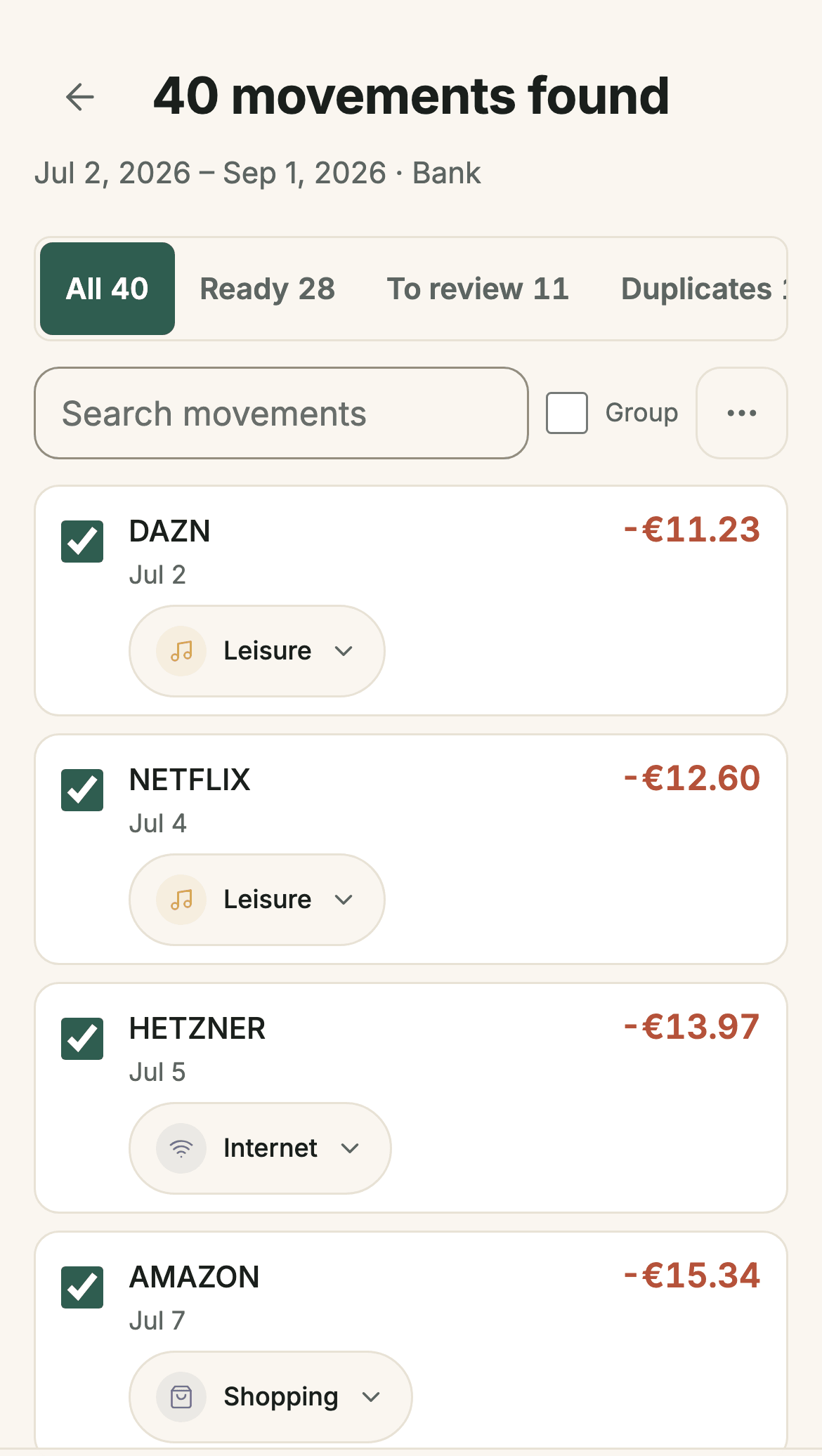
Reviewing imported transactions in Sumant before saving them
Sumant screenshot: reviewing an import. The filters let you check transactions, categories and duplicates before confirming.

Can you bring transactions from Excel (.xlsx) into Sumant?

You can select an XLSX or CSV file, choose a destination account and review its transactions before importing. Check which sheet contains your records, how dates are interpreted and what the amounts represent. Importing brings in transactions; it does not carry over formulas, charts or the full structure of your workbook.

Keep the original and start with a small period. The free plan includes one confirmed import of up to 250 selected transactions from a file. Reviewing lets you check the selection before saving; do not assume that every template uses the same columns or that a file extension guarantees compatibility.

See how import review works

What does each option cost for expense tracking?

The web version of Excel (.xlsx) is free with a Microsoft account; the desktop app requires a suitable licence. Sumant offers a free plan and PRO Founder for €19.99 as a one-time payment. Compare what is included, too: downloading a template, importing transactions and exporting saved data are separate tasks.

The Sumant expense template is free to download without registration. Using the app requires an account. The free plan supports JSON export; CSV and XLSX exports require PRO. If you already hold a desktop licence, check its terms before treating continued spreadsheet use as a new expense.

Microsoft: free web apps · Checked on

Microsoft: web access and licence differences · Checked on

Check Sumant features and plan limits

When should you keep using your spreadsheet?

Keeping it can make sense when its formulas, layout or shared editing are part of a routine that helps you understand expenses. An app may fit if you want to try a defined recording and review process. You do not need to move your whole history to assess the difference: compare one period first.

Write down the question each workbook view answers. If a feature is essential, check that the app provides it before switching. Sumant is designed for individual finances and does not replace every spreadsheet use; your current system may remain useful without adding another tool.

These comparisons give you other expense apps to consider alongside a spreadsheet. Check how transactions are recorded, which tasks work on a computer and what requires payment. Use the same criteria for each option so you can compare their conditions with the work you do each month.

See all comparisons →

Try a small period with your transactions

Start with a free account and record a few expenses to try the process. The free plan also includes one import of up to 250 selected transactions. Check dates, categories and amounts before confirming, then compare the result with your spreadsheet while you decide how to continue.

Get started free
Excel (.xlsx) alternatives: track expenses free